Creating a TV streaming server is no longer a project reserved for major broadcasters and global media companies.
Independent content producers, churches, universities, local television stations, sports organizations, educational companies, event producers, content distributors, and startups can now launch live channels and video-on-demand services that work on websites, smartphones, and Smart TVs.
A modern TV streaming server can distribute content to:
- Samsung Smart TVs;
- LG webOS televisions;
- Roku devices;
- Android TV;
- Google TV;
- Fire TV;
- Apple TV;
- smartphones;
- tablets;
- desktop browsers;
- connected television applications.
However, a professional streaming platform is not simply a website containing a video player.
A complete streaming system must receive a video signal, encode it, create different quality levels, package the content into a streaming format, deliver it over HTTPS, manage access, monitor performance, and scale when the audience grows.
The most common delivery format for broad television compatibility is HLS, or HTTP Live Streaming. HLS distributes live and on-demand content over standard HTTP infrastructure and can use ordinary web servers and content delivery networks. It also supports adaptive playback, allowing compatible players to change quality when network conditions change.
This guide explains how to build that infrastructure from the ground up.
You will learn how to:
- choose the correct server;
- receive a stream from OBS or an encoder;
- use RTMP or SRT for contribution;
- process video with FFmpeg;
- create adaptive HLS playlists;
- deploy SRS as a media server;
- configure NGINX and HTTPS;
- connect the stream to Smart TV applications;
- protect the origin server;
- add a CDN;
- calculate bandwidth;
- create linear channels;
- monitor availability;
- prepare the project for production.
🎯 What Is a TV Streaming Server?
A TV streaming server is an infrastructure that receives, processes, stores, packages, and distributes video content over the internet.
The source of the video may be:
- a studio camera;
- an OBS Studio production;
- a professional hardware encoder;
- a television automation system;
- a playlist of MP4 files;
- a satellite receiver;
- a remote event;
- a live sports production;
- another streaming provider;
- a cloud-based playout platform.
The incoming signal is called the contribution stream or ingest stream.
After receiving the source, the platform may perform several operations:
- Decode the incoming video.
- Resize it into different resolutions.
- Re-encode it using a compatible codec.
- Normalize audio.
- Create multiple bitrate versions.
- Generate HLS or DASH segments.
- Publish a master playlist.
- Deliver the content through HTTPS.
- Cache the segments through a CDN.
- Send playback analytics to a monitoring platform.
The television application normally does not connect directly to the camera or OBS computer.
Instead, it receives a URL such as:
https://stream.example.com/live/channel1/master.m3u8That URL points to an HLS multivariant playlist.
The playlist describes the video qualities available to the player.
For example:
#EXTM3U

#EXT-X-STREAM-INF:BANDWIDTH=5500000,RESOLUTION=1920x1080
1080p/index.m3u8

#EXT-X-STREAM-INF:BANDWIDTH=3000000,RESOLUTION=1280x720
720p/index.m3u8

#EXT-X-STREAM-INF:BANDWIDTH=1500000,RESOLUTION=854x480
480p/index.m3u8
A compatible Smart TV can select a lower or higher stream according to available bandwidth and playback conditions.
This process is known as adaptive bitrate streaming, or ABR.
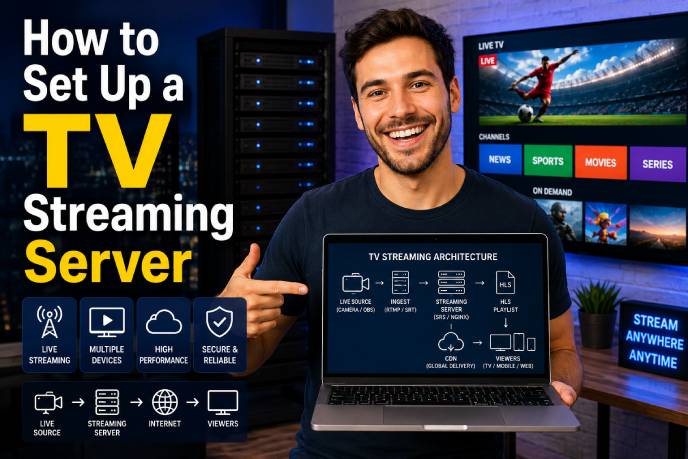
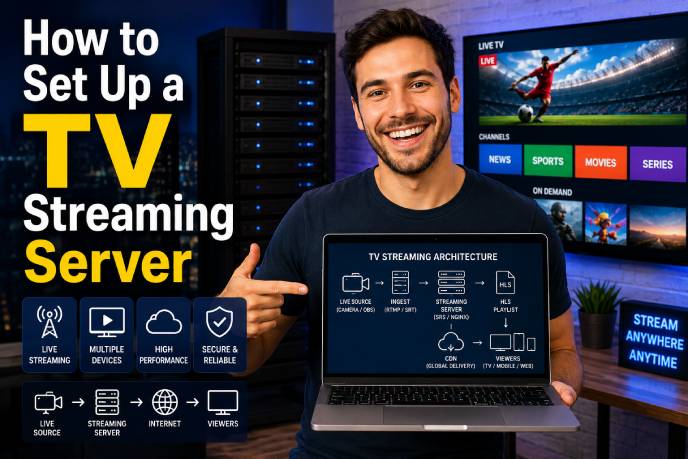
🧩 Understanding the Streaming Architecture
Before installing software, it is important to understand how the pieces fit together.
A standard architecture looks like this:
Video Source
     ↓
Ingest Protocol
     ↓
Media Server
     ↓
Transcoding
     ↓
Packaging
     ↓
Origin Server
     ↓
CDN
     ↓
Smart TV App or Player
Let us examine each stage.
1. Video source
The source produces the original audio and video signal.
Examples include:
- OBS Studio;
- Wirecast;
- vMix;
- hardware encoders;
- IP cameras;
- studio switchers;
- television playout software;
- files reproduced through FFmpeg;
- remote SRT feeds.
The source should have a stable frame rate, predictable audio levels, and a resolution suitable for the target platform.
2. Ingest
Ingest is the method used to send the source signal to the media server.
Popular contribution protocols include:
- RTMP;
- SRT;
- RTSP;
- RIST;
- WHIP;
- MPEG-TS over UDP;
- HLS contribution.
RTMP remains useful because it works with many production tools and encoders.
SRT is often chosen when the source is being transported across an unreliable network. SRS supports streaming workflows involving RTMP, HLS, WebRTC, HTTP-FLV, and SRT, making it suitable as a gateway between contribution and delivery formats.
3. Transcoding
Transcoding creates new versions of the incoming video.
Suppose the studio sends a 1080p stream at 8 Mbps. Your platform might generate:
- 1080p at 5 Mbps;
- 720p at 3 Mbps;
- 480p at 1.5 Mbps;
- 360p at 700 Kbps.
Users with fast connections can watch the higher quality version. Viewers with unstable or slower connections can receive a lower bitrate.
Transcoding is one of the most resource-intensive parts of a streaming platform.
4. Packaging
Packaging organizes encoded video into a delivery format.
Common formats include:
- HLS;
- MPEG-DASH;
- CMAF;
- Microsoft Smooth Streaming.
For a first multi-platform Smart TV project, HLS is often the most practical starting point because of its broad ecosystem and compatibility.
5. Origin server
The origin server stores or exposes:
- HLS playlists;
- MPEG-TS segments;
- fragmented MP4 segments;
- subtitle files;
- encryption keys;
- video-on-demand files;
- thumbnails;
- manifests;
- metadata.
The origin should be stable and protected. In larger deployments, the public audience should receive the content through a CDN instead of connecting directly to the origin.
6. CDN
A content delivery network caches video segments closer to viewers.
Instead of one server responding to every request, edge locations distribute the load.
A CDN can improve:
- scalability;
- geographic performance;
- startup time;
- origin protection;
- availability;
- resistance to traffic spikes.
7. Application and player
The last stage is the player.
The player may be part of:
- a Samsung Tizen application;
- an LG webOS application;
- a Roku SceneGraph channel;
- an Android TV application;
- a web application;
- an iOS or tvOS application.
The player loads the playlist, chooses an appropriate quality, buffers segments, decodes the media, and displays it to the viewer.
🌐 Choosing the Right Streaming Protocol
Different protocols solve different problems.
Using the same protocol for every stage is rarely the best architecture.
📡 RTMP
RTMP is commonly used to send live video from an encoder to a media server.
Example:
OBS → RTMP → SRSA publishing URL may look like:
rtmp://stream.example.com/live/channel1RTMP is convenient for ingest, but it is generally not the preferred final-delivery protocol for modern Smart TV applications.
A more common workflow is:
RTMP ingest → HLS delivery🛰️ SRT
SRT can be useful for contribution over unstable internet connections.
It includes mechanisms for recovering from packet loss and handling network variation. A media gateway can receive SRT and convert the stream into formats such as RTMP, HLS, or WebRTC. SRS documents workflows in which OBS or FFmpeg sends SRT and the server converts it into other streaming formats.
📺 HLS
HLS is designed for live and on-demand distribution over HTTP.
A typical HLS stream contains:
- a multivariant playlist;
- one media playlist per rendition;
- short video segments;
- optional audio tracks;
- optional subtitles;
- optional encryption information.
Apple describes HLS as a method of distributing live and on-demand media through ordinary web servers and CDNs, with dynamic adaptation to available network conditions.
📊 MPEG-DASH
MPEG-DASH is another adaptive streaming format.
It is often used in environments involving:
- Widevine DRM;
- Android devices;
- browser players;
- CMAF packaging;
- multi-DRM services.
The manifest commonly uses the .mpd extension.
⚡ WebRTC
WebRTC is suitable when very low latency is essential.
Examples include:
- interactive auctions;
- two-way communication;
- remote production;
- live education;
- real-time audience interaction.
For a traditional linear television channel, a few seconds of delay may be acceptable. HLS is usually easier to cache and scale.
🖥️ Server Requirements
Your hardware requirements depend on what the server must do.
A server that only receives an already encoded stream and repackages it uses far fewer resources than a server that creates four new video qualities.
Consider:
- number of channels;
- input resolution;
- input bitrate;
- output resolutions;
- codec;
- frame rate;
- simultaneous viewers;
- recording requirements;
- DVR window;
- latency target;
- geographic audience.
Small laboratory server
A basic test server may begin with:
2 vCPUs
4 GB RAM
40–80 GB SSD
Ubuntu Server
Public IPv4 address
1 Gbps network port
This can be enough for:
- one test stream;
- RTMP ingest;
- HLS packaging;
- limited playback testing;
- no heavy multi-rendition transcoding.
Small production project
A small live channel with software transcoding may require:
4–8 vCPUs
8–16 GB RAM
100 GB SSD or more
1 Gbps network
External CDN
Monitoring
Automatic restart
Multi-channel platform
A larger OTT or FAST TV service may use:
Dedicated ingest nodes
GPU-enabled transcoders
Multiple origin servers
Object storage
Load balancing
CDN delivery
Database and API servers
Monitoring stack
Backup encoders
Failover infrastructure
Do not assume that more RAM will solve a transcoding bottleneck. Video encoding often depends primarily on CPU or GPU capacity.
📊 How to Calculate Streaming Bandwidth
Bandwidth planning is essential.
A convenient estimate is:
Data per viewer per hour in GB ≈ bitrate in Mbps × 0.45For a 3 Mbps stream:
3 × 0.45 = 1.35 GB per viewer per hourFor 100 viewers watching for one hour:
1.35 × 100 = 135 GBThe required outbound speed is:
Concurrent viewers × average bitrateFor 100 viewers at 3 Mbps:
100 × 3 Mbps = 300 MbpsFor 1,000 viewers:
1,000 × 3 Mbps = 3,000 MbpsThat equals approximately 3 Gbps.
A server with a 1 Gbps connection cannot directly deliver 3 Gbps. Even before reaching the theoretical maximum, operating-system overhead, traffic bursts, other services, and network limits reduce usable capacity.
This is one reason a CDN becomes important when the audience grows.
Monthly traffic example
Suppose your platform has:
- 200 daily viewers;
- 90 minutes watched per viewer;
- average selected bitrate of 2.5 Mbps;
- 30 days per month.
Approximate traffic:
2.5 Mbps × 0.45 = 1.125 GB per hourEach user watches 1.5 hours:
1.125 × 1.5 = 1.6875 GB per viewerFor 200 daily viewers:
1.6875 × 200 = 337.5 GB per dayFor 30 days:
337.5 × 30 = 10,125 GBThat is approximately 10.1 TB per month.
This calculation demonstrates why streaming costs are often driven more by transfer volume than by website hosting.
🧰 Recommended Software Stack
A practical open-source stack can include:
| Component | Purpose |
|---|---|
| Ubuntu Server | Operating system |
| Docker | Container management |
| SRS | Ingest and media gateway |
| FFmpeg | Encoding and transcoding |
| NGINX | HTTP delivery and reverse proxy |
| Certbot | TLS certificate automation |
| CDN | Edge delivery |
| Prometheus/Grafana | Monitoring |
| API application | Authentication and metadata |
FFmpeg describes itself as a universal media converter capable of reading many types of inputs, filtering or transcoding them, and writing multiple output formats.
NGINX can operate as an HTTP server, reverse proxy, content cache, load balancer, and TCP/UDP proxy. Its proxy module can forward requests to another local or remote service.
🚀 Step 1: Create the Linux Server
Choose a VPS, cloud instance, or dedicated server.
For a test project, install a current Ubuntu LTS release.
You will need:
Public IP address
SSH credentials
Root or sudo access
A domain name
Connect using SSH:
ssh root@YOUR_SERVER_IPUpdate the operating system:
apt update
apt upgrade -y
Install basic tools:
apt install -y \
  curl \
  wget \
  git \
  ufw \
  ca-certificates \
  gnupg \
  ffmpeg \
  nginx
Check FFmpeg:
ffmpeg -versionCheck NGINX:
nginx -v🐳 Step 2: Install Docker
Install Docker using the supported method for your operating system.
On a simple Ubuntu laboratory server, the distribution package may be sufficient:
apt install -y docker.io docker-compose-pluginEnable the service:
systemctl enable docker
systemctl start docker
Verify:
docker --version
docker compose version
📡 Step 3: Run SRS
SRS is an open-source media server focused on real-time streaming and supports protocols including RTMP, HLS, WebRTC, HTTP-FLV, and SRT.
Create a project directory:
mkdir -p /opt/tv-streaming
cd /opt/tv-streaming
Create a Docker Compose file:
nano compose.ymlExample:
services:
  srs:
    image: ossrs/srs:5
    container_name: srs
    restart: unless-stopped
    ports:
      - "1935:1935"
      - "8080:8080"
    networks:
      - streaming

networks:
  streaming:
    driver: bridge
Start the container:
docker compose up -dCheck its status:
docker compose psRead logs:
docker logs -f srsOfficial SRS examples document port 1935 for RTMP and port 8080 for HTTP/HLS delivery.
For production, pin a stable image version that you have tested rather than automatically upgrading an unverified image.
🔥 Step 4: Configure the Firewall
Allow SSH, HTTP, HTTPS, and RTMP:
ufw allow 22/tcp
ufw allow 80/tcp
ufw allow 443/tcp
ufw allow 1935/tcp
ufw enable
Check:
ufw statusAvoid publicly exposing administrative APIs unless they are protected.
🎥 Step 5: Publish a Stream from OBS
Open OBS Studio and navigate to:
Settings → StreamSelect a custom service.
Use:
Server:
rtmp://YOUR_SERVER_IP/liveStream key:
channel1The full publishing address becomes:
rtmp://YOUR_SERVER_IP/live/channel1After starting the broadcast, the HLS URL may be available as:
http://YOUR_SERVER_IP:8080/live/channel1.m3u8This RTMP-to-HLS workflow is documented in the SRS deployment examples.
Test the HLS URL using VLC:
Media → Open Network StreamPaste:
http://YOUR_SERVER_IP:8080/live/channel1.m3u8If playback begins, the basic ingest and packaging pipeline is working.
🎬 Step 6: Publish a File with FFmpeg
You can simulate a 24-hour television channel using an MP4 file.
Example:
ffmpeg \
  -re \
  -stream_loop -1 \
  -i program.mp4 \
  -c:v libx264 \
  -preset veryfast \
  -b:v 3000k \
  -maxrate 3200k \
  -bufsize 6000k \
  -g 60 \
  -keyint_min 60 \
  -sc_threshold 0 \
  -c:a aac \
  -b:a 128k \
  -ar 48000 \
  -f flv \
  rtmp://127.0.0.1/live/channel1
Important parameters:
-re
Reads the input at approximately its native playback speed instead of processing it as fast as possible.
-stream_loop -1
Repeats the source indefinitely.
-c:v libx264
Encodes the video using H.264.
-preset veryfast
Balances CPU usage and compression efficiency.
-b:v 3000k
Sets the target video bitrate.
-g 60
Sets the GOP length. At 30 frames per second, 60 frames represent approximately two seconds.
-sc_threshold 0
Prevents automatic scene-cut keyframes from disrupting fixed GOP alignment.
-c:a aac
Encodes audio as AAC.
-f flv
Creates an output suitable for RTMP publishing.
FFmpeg supports a wide range of protocols and output containers through its libavformat infrastructure.
🎚️ Step 7: Create Adaptive Bitrate HLS
A single-quality stream is vulnerable to buffering.
A viewer with limited bandwidth may be unable to maintain a 1080p stream. A viewer with a fast connection should not be forced to watch a low-resolution version.
Create an encoding ladder.
Suggested starter ladder
| Rendition | Resolution | Video bitrate | Audio |
|---|---|---|---|
| 1080p | 1920×1080 | 4.5–6 Mbps | 128 Kbps |
| 720p | 1280×720 | 2.5–3.5 Mbps | 128 Kbps |
| 480p | 854×480 | 1.2–1.8 Mbps | 96 Kbps |
| 360p | 640×360 | 600–900 Kbps | 96 Kbps |
These values are starting points.
Sports, gaming, and fast camera movement generally require more bitrate than interviews, presentations, or static studio programs.
Create output directories:
mkdir -p /var/www/hls/channel1/{1080p,720p,480p}Example FFmpeg command:
ffmpeg \
  -i rtmp://127.0.0.1/live/channel1 \
  -filter_complex "
    [0:v]split=3[v1080][v720][v480];
    [v1080]scale=1920:1080[v1080out];
    [v720]scale=1280:720[v720out];
    [v480]scale=854:480[v480out]
  " \
  -map "[v1080out]" -map 0:a:0 \
  -map "[v720out]"  -map 0:a:0 \
  -map "[v480out]"  -map 0:a:0 \
  -c:v libx264 \
  -preset veryfast \
  -g 60 \
  -keyint_min 60 \
  -sc_threshold 0 \
  -b:v:0 5000k \
  -maxrate:v:0 5350k \
  -bufsize:v:0 10000k \
  -b:v:1 2800k \
  -maxrate:v:1 2996k \
  -bufsize:v:1 5600k \
  -b:v:2 1400k \
  -maxrate:v:2 1498k \
  -bufsize:v:2 2800k \
  -c:a aac \
  -b:a:0 128k \
  -b:a:1 128k \
  -b:a:2 96k \
  -ar 48000 \
  -f hls \
  -hls_time 4 \
  -hls_list_size 8 \
  -hls_flags delete_segments+independent_segments \
  -master_pl_name master.m3u8 \
  -var_stream_map "v:0,a:0,name:1080p v:1,a:1,name:720p v:2,a:2,name:480p" \
  -hls_segment_filename "/var/www/hls/channel1/%v/segment_%06d.ts" \
  "/var/www/hls/channel1/%v/index.m3u8"
The output structure should resemble:
/var/www/hls/channel1/master.m3u8
/var/www/hls/channel1/1080p/index.m3u8
/var/www/hls/channel1/720p/index.m3u8
/var/www/hls/channel1/480p/index.m3u8
The player should open:
https://stream.example.com/hls/channel1/master.m3u8The FFmpeg HLS muxer includes options for segment duration, playlist size, segment filenames, master playlists, and multiple variant streams.
Important GOP rule
All renditions should have aligned keyframes.
When the player switches from 720p to 480p, it should find equivalent segment boundaries and decoding points.
For 30 fps with a two-second GOP:
30 × 2 = 60 framesUse:
-g 60
-keyint_min 60
-sc_threshold 0
For 25 fps:
25 × 2 = 50 framesAdjust the GOP according to your actual frame rate.
🔐 Step 8: Configure a Domain and HTTPS
An IP-based URL is acceptable for testing.
Production should use a domain such as:
stream.example.comCreate a DNS A record:
Type: A
Name: stream
Value: YOUR_SERVER_IP
Create an NGINX virtual host:
nano /etc/nginx/sites-available/streamExample:
server {
    listen 80;
    server_name stream.example.com;

    location /hls/ {
        root /var/www;

        types {
            application/vnd.apple.mpegurl m3u8;
            video/mp2t ts;
            video/mp4 mp4 m4s;
        }

        add_header Access-Control-Allow-Origin "*" always;
        add_header Access-Control-Allow-Methods "GET, HEAD, OPTIONS" always;
        add_header Access-Control-Allow-Headers "Origin, Range, Accept, Content-Type" always;
        add_header Access-Control-Expose-Headers "Content-Length, Content-Range" always;

        if ($request_method = OPTIONS) {
            return 204;
        }
    }

    location /srs/ {
        proxy_pass http://127.0.0.1:8080/;
        proxy_http_version 1.1;

        proxy_set_header Host $host;
        proxy_set_header X-Real-IP $remote_addr;
        proxy_set_header X-Forwarded-For $proxy_add_x_forwarded_for;
        proxy_set_header X-Forwarded-Proto $scheme;
    }
}
Enable it:
ln -s /etc/nginx/sites-available/stream \
      /etc/nginx/sites-enabled/stream
Validate:
nginx -tReload:
systemctl reload nginxNGINX’s proxy module passes requests to upstream services using directives such as proxy_pass and proxy_set_header.
Install Certbot:
apt install -y certbot python3-certbot-nginxRequest a certificate:
certbot --nginx -d stream.example.comYour stream becomes:
https://stream.example.com/hls/channel1/master.m3u8HTTPS is important because browsers, APIs, television platforms, and application stores increasingly expect secure media delivery.
📺 Connecting the Stream to Smart TV Applications
A technically valid stream can still fail on a television if the device does not support the codec, playlist tags, audio configuration, or container.
Always test on real devices.
Samsung Tizen
Samsung provides the AVPlay API for multimedia playback in television applications. AVPlay can open remote network media URIs, report buffering events, and control playback. Samsung also documents adaptive-streaming behavior and HLS tag support by Tizen version.
Conceptual JavaScript example:
const streamUrl =
  "https://stream.example.com/hls/channel1/master.m3u8";

webapis.avplay.open(streamUrl);

webapis.avplay.setDisplayRect(0, 0, 1920, 1080);

webapis.avplay.setListener({
  onbufferingstart: function () {
    console.log("Buffering started");
  },

  onbufferingcomplete: function () {
    console.log("Buffering finished");
  },

  onstreamcompleted: function () {
    console.log("Stream completed");
  },

  onerror: function (error) {
    console.error("Playback error:", error);
  }
});

webapis.avplay.prepareAsync(
  function () {
    webapis.avplay.play();
  },
  function (error) {
    console.error("Prepare error:", error);
  }
);
Do not assume that every HLS tag supported by a newer television is supported by an older model.
LG webOS
LG webOS applications may use an HTML5 video element for compatible media workflows.
Conceptual example:
<video
  id="player"
  autoplay
  controls
  playsinline
  style="width:100%;height:100%;background:#000"
>
  <source
    src="https://stream.example.com/hls/channel1/master.m3u8"
    type="application/vnd.apple.mpegurl"
  >
</video>
For production, add:
- error listeners;
- retry logic;
- network monitoring;
- player-state handling;
- recovery after standby;
- focus management for the remote control.
Roku
Roku supports standard adaptive protocols including HLS and DASH. Roku’s streaming specifications recommend providing multiple video streams at different quality levels so the device can select according to network conditions.
SceneGraph example:
content = CreateObject("roSGNode", "ContentNode")

content.url = "https://stream.example.com/hls/channel1/master.m3u8"
content.streamFormat = "hls"
content.title = "Live Channel"

m.video.content = content
m.video.control = "play"
Android TV
AndroidX Media3 ExoPlayer supports HLS through its HLS module. The media samples contained inside the HLS stream must also use formats supported by the device.
Kotlin example:
val player = ExoPlayer.Builder(context).build()

val mediaItem = MediaItem.fromUri(
    "https://stream.example.com/hls/channel1/master.m3u8"
)

player.setMediaItem(mediaItem)
player.prepare()
player.play()
A basic dependency may resemble:
implementation("androidx.media3:media3-exoplayer-hls:<version>")Use the current tested Media3 version for your application rather than copying an old version number without verification.
🌍 Step 9: Add a CDN
The origin server should not necessarily deliver every segment directly to every viewer.
A CDN can cache the segments and distribute them through edge locations.
The architecture becomes:
Encoder
   ↓
Ingest server
   ↓
Transcoder
   ↓
HLS origin
   ↓
CDN
   ↓
Smart TV applications
Cache strategy
Live playlists change frequently.
Use a shorter cache policy for:
master.m3u8
index.m3u8
Segments can normally use a longer cache policy:
segment_000123.ts
segment_000124.ts
A stale live playlist may cause:
- playback behind the live edge;
- missing segments;
- repeated segments;
- startup failures;
- excessive latency.
Protecting the origin
Where supported, configure the origin so it accepts requests only from:
- CDN address ranges;
- a private network;
- an authenticated proxy;
- signed requests.
If the origin URL remains publicly accessible, users may bypass your CDN and consume your server bandwidth directly.
🛡️ Securing the Streaming Platform
A publicly available streaming server can attract abuse.
Potential problems include:
- unauthorized restreaming;
- stolen stream keys;
- bandwidth theft;
- origin scraping;
- unauthorized publishing;
- API attacks;
- token sharing;
- excessive connection attempts.
Use strong publishing keys
Avoid predictable URLs such as:
rtmp://stream.example.com/live/channel1Use a long publishing token:
rtmp://stream.example.com/live/9Gx7pQ2mL8vK4nT1Do not expose this key in public JavaScript or application packages.
Validate publishers
A production system should validate:
- stream key;
- user or encoder identity;
- channel status;
- allowed IP;
- token expiration;
- publishing permissions.
Use signed playback URLs
Example:
https://cdn.example.com/live/channel1/master.m3u8
?expires=1780000000
&token=SIGNED_VALUE
The edge or application validates:
- signature;
- expiration;
- resource path;
- optional user information.
Restrict administrative services
Administrative APIs should be:
- bound to localhost;
- protected by a firewall;
- placed behind a VPN;
- authenticated;
- logged.
Rate-limit abusive requests
Apply limits to:
- authentication endpoints;
- token-generation endpoints;
- API searches;
- repeated invalid requests;
- account login attempts.
Content protection
Basic projects may use tokenized URLs or HLS encryption.
Premium services may require platform DRM systems and a license server.
DRM architecture normally includes:
Packager
License server
Entitlement service
Player integration
Authentication API
Key management
DRM is more complex than hiding a playlist URL. It should be designed as part of the business model and device-compatibility strategy.
⏱️ Managing Latency
Latency is the delay between capture and playback.
It may be introduced by:
- the camera;
- encoder buffers;
- network transport;
- transcoding;
- segment duration;
- playlist size;
- CDN caching;
- player buffering.
A traditional HLS channel may have several seconds of latency.
To reduce latency:
- Shorten segment duration.
- Use aligned GOPs.
- Reduce unnecessary buffers.
- Avoid transcoding when it is not required.
- Place ingest near the encoder.
- Use a resilient contribution protocol.
- Configure the CDN for live traffic.
- Reduce the player’s target buffer.
- Consider Low-Latency HLS.
- Consider WebRTC for truly interactive applications.
Reducing segment duration is not free.
Shorter segments increase:
- HTTP requests;
- playlist updates;
- server overhead;
- sensitivity to jitter;
- CDN complexity.
The correct latency target depends on the product.
A movie channel may tolerate more delay than a live auction or interactive event.
🗓️ Creating a 24/7 Linear TV Channel
A streaming server distributes the channel, but it does not automatically create the schedule.
For linear television, you also need a playout system.
The playout decides what should be shown at each time.
Example schedule:
06:00 — Morning News
08:00 — Children’s Program
10:00 — Documentary
11:30 — Commercial Break
12:00 — Midday News
13:00 — Movie
15:00 — Interview Program
17:00 — Sports Magazine
19:00 — Evening News
20:00 — Prime-Time Series
The playout may manage:
- program files;
- live inserts;
- advertisements;
- station identification;
- logos;
- bumpers;
- countdowns;
- emergency filler;
- schedule changes;
- audio normalization.
Simple FFmpeg playlist
Create a file:
playlist.txtContent:
file 'news.mp4'
file 'bumper.mp4'
file 'documentary.mp4'
file 'commercial.mp4'
file 'interview.mp4'
Run:
ffmpeg \
  -re \
  -f concat \
  -safe 0 \
  -i playlist.txt \
  -c:v libx264 \
  -preset veryfast \
  -b:v 3000k \
  -c:a aac \
  -b:a 128k \
  -f flv \
  rtmp://127.0.0.1/live/channel1
This is acceptable for a laboratory.
A professional playout system should also manage:
- inconsistent source resolutions;
- missing files;
- unexpected aspect ratios;
- audio loudness;
- schedule timing;
- live-event switching;
- automated recovery;
- program logging;
- advertisement reports.
📅 EPG: Electronic Program Guide
A Smart TV application becomes more useful when it knows what is currently playing.
The EPG may include:
- channel name;
- current program;
- next program;
- start and end times;
- description;
- poster image;
- rating;
- category;
- episode information.
Example API response:
{
  "channel": {
    "id": "channel1",
    "name": "Example TV"
  },
  "now": {
    "title": "Morning News",
    "start": "2026-07-10T08:00:00-03:00",
    "end": "2026-07-10T09:00:00-03:00",
    "description": "Daily national and international news."
  },
  "next": {
    "title": "Technology Today",
    "start": "2026-07-10T09:00:00-03:00",
    "end": "2026-07-10T10:00:00-03:00"
  }
}
The TV interface can display:
Now: Morning News
Next: Technology Today
For a FAST TV service, the EPG is central to navigation and discovery.
💾 Adding Video on Demand
The same platform may support live and on-demand content.
Live URL
https://stream.example.com/live/channel1/master.m3u8VOD URL
https://stream.example.com/vod/movie123/master.m3u8Create a simple HLS VOD package:
mkdir -p /var/www/vod/movie123
cd /var/www/vod/movie123
Run:
ffmpeg \
  -i /media/movie123.mp4 \
  -c:v libx264 \
  -preset medium \
  -c:a aac \
  -b:a 128k \
  -g 60 \
  -keyint_min 60 \
  -sc_threshold 0 \
  -hls_time 6 \
  -hls_playlist_type vod \
  -hls_segment_filename "segment_%05d.ts" \
  index.m3u8
For a professional catalog, also create:
- adaptive renditions;
- subtitles;
- thumbnails;
- poster images;
- metadata;
- categories;
- search indexes;
- recommendation data;
- entitlement rules;
- resume position.
📈 Monitoring the Streaming Server
A stream can return HTTP 200 and still be broken.
Monitoring should inspect:
- playlist availability;
- segment freshness;
- video bitrate;
- audio bitrate;
- resolution;
- frame rate;
- frozen images;
- silence;
- black frames;
- latency;
- buffering;
- CPU;
- memory;
- disk usage;
- network traffic;
- FFmpeg processes;
- active connections;
- HTTP error rates.
Test with FFprobe
ffprobe \
  -v error \
  -show_streams \
  -show_format \
  https://stream.example.com/hls/channel1/master.m3u8
FFprobe is designed to inspect multimedia information and expose stream and format details for human or automated analysis.
Test the HTTP response
curl -I \
  https://stream.example.com/hls/channel1/master.m3u8
Expected response:
HTTP/2 200
content-type: application/vnd.apple.mpegurl
Basic health-check script
#!/usr/bin/env bash

set -u

URL="https://stream.example.com/hls/channel1/master.m3u8"

STATUS=$(curl \
  --silent \
  --output /dev/null \
  --write-out "%{http_code}" \
  "$URL")

if [ "$STATUS" != "200" ]; then
  echo "ALERT: Channel unavailable. HTTP status: $STATUS"
  exit 1
fi

echo "Channel online"
A stronger monitor should also verify that new segments continue appearing.
A playlist that has stopped updating may still return a successful HTTP response.
🔄 Redundancy and Failover
A television channel should not depend on one process.
A resilient architecture may contain:
Primary encoder
Backup encoder

Primary ingest
Backup ingest

Primary transcoder
Backup transcoder

Primary origin
Backup origin

Primary CDN
Secondary CDN
The monitoring system should detect:
- encoder offline;
- no audio;
- no video;
- frozen picture;
- stale playlist;
- FFmpeg crash;
- full disk;
- network interruption;
- origin failure.
Possible recovery actions include:
- restart the process;
- switch to the backup input;
- show an emergency slate;
- redirect the CDN;
- notify an operator;
- launch a backup virtual machine.
💰 How Much Does a TV Streaming Server Cost?
The cost is determined by more than the VPS price.
Main cost categories include:
| Cost | Description |
|---|---|
| Compute | CPU or GPU transcoding |
| Bandwidth | Video traffic delivered |
| Storage | VOD, DVR, recordings |
| CDN | Edge delivery |
| Monitoring | Metrics and alerts |
| DRM | License and key services |
| Development | Website and Smart TV apps |
| Playout | Linear schedule automation |
| Support | Operations and incident response |
| Redundancy | Backup systems |
Small test project
A small laboratory may use:
- one VPS;
- one test channel;
- no CDN;
- one video quality;
- limited viewers.
Small professional channel
A production service may require:
- dedicated origin;
- multiple renditions;
- CDN;
- HTTPS;
- monitoring;
- backup process;
- EPG API;
- Smart TV applications.
Large platform
A larger service may require:
- multiple transcoders;
- GPU instances;
- multi-region origin;
- several CDNs;
- object storage;
- DRM;
- ad insertion;
- analytics;
- 24/7 operations.
Always calculate projected viewing hours before launching.
❌ Common Streaming Server Mistakes
1. Using shared website hosting
Shared hosting is usually designed for:
- PHP;
- databases;
- websites;
- e‑mail.
It is not normally designed for continuous video transcoding, open ingest ports, long-running FFmpeg processes, or high outbound traffic.
Use a VPS, dedicated server, cloud service, or specialized streaming provider.
2. Offering only one bitrate
A single bitrate creates buffering for slower users and wastes quality for faster users.
Create an adaptive ladder.
3. Ignoring audio compatibility
A stream may display video but produce no sound.
Use a broadly compatible audio format and test on real televisions.
4. Failing to align keyframes
Poorly aligned GOPs can make adaptive switching unreliable.
Use consistent GOP values across renditions.
5. Incorrect MIME types
Use appropriate types such as:
application/vnd.apple.mpegurl
video/mp2t
video/mp4
6. Missing CORS headers
Web-based players and some application environments may fail to request media across domains.
Configure CORS carefully.
7. No HTTPS
A secure application may reject insecure media.
Use a valid certificate.
8. Publishing the origin publicly
Users may bypass your CDN.
Protect the origin.
9. No monitoring
Discovering a failure through viewer complaints is not an operational strategy.
Create automated health checks.
10. Testing only in a desktop browser
A stream that works in Chrome may fail on an older television.
Test on:
- Samsung devices;
- LG devices;
- Roku;
- Android TV;
- slower networks;
- Wi-Fi;
- Ethernet.
✅ Production Checklist
Before launching, verify:
[ ] The stream is available over HTTPS
[ ] The domain resolves correctly
[ ] The TLS certificate renews automatically
[ ] HLS MIME types are correct
[ ] CORS is configured
[ ] At least three video renditions exist
[ ] GOPs are aligned
[ ] Segment durations are consistent
[ ] Audio is present and synchronized
[ ] Stream keys are protected
[ ] Administrative ports are restricted
[ ] The CDN is configured
[ ] The origin is protected
[ ] Monitoring is active
[ ] Alerts reach the technical team
[ ] FFmpeg restarts automatically
[ ] The server has sufficient disk space
[ ] Logs are rotated
[ ] Backups exist
[ ] Smart TV applications handle playback errors
[ ] Players retry after connection loss
[ ] The content has proper distribution rights
[ ] Real televisions have been tested
❓ Frequently Asked Questions
Can I create a streaming server for free?
You can use open-source software such as FFmpeg, SRS, and NGINX without buying a traditional software license.
However, production still has costs:
- server rental;
- bandwidth;
- domain;
- storage;
- CDN;
- monitoring;
- application development.
Can I use my home computer?
A home computer can be used for testing.
It is risky for production because of:
- power outages;
- unstable upload;
- dynamic IP addresses;
- residential traffic limits;
- lack of redundancy;
- hardware failure.
How many viewers can one server support?
It depends on:
- average bitrate;
- available outbound bandwidth;
- CPU usage;
- number of connections;
- disk performance;
- whether a CDN is used.
A theoretical 500 Mbps outbound connection serving 3 Mbps streams would support fewer than:
500 ÷ 3 = 166 viewersThe practical limit should be lower because capacity must be reserved for overhead and traffic variation.
Do I need a CDN?
Not necessarily for a local test.
A CDN becomes increasingly useful for:
- national audiences;
- multiple regions;
- live events;
- hundreds or thousands of viewers;
- traffic spikes;
- origin protection.
Which video codec should I use?
For broad compatibility, H.264 remains a practical baseline.
More efficient codecs may reduce bandwidth but require careful device testing.
Which audio codec should I use?
AAC is widely used in television streaming workflows.
Always test the exact profile, channel layout, sampling rate, and bitrate on your target devices.
Can I host several channels?
Yes.
Use different stream names:
rtmp://stream.example.com/live/news
rtmp://stream.example.com/live/sports
rtmp://stream.example.com/live/movies
Possible outputs:
/live/news.m3u8
/live/sports.m3u8
/live/movies.m3u8
Can I monetize the channel?
Possible business models include:
- subscriptions;
- advertising;
- sponsorships;
- pay-per-view;
- transactional video;
- FAST channels;
- licensing;
- premium memberships.
You must own or license the rights to distribute the content.
🏁 Conclusion
Creating a TV streaming server requires several coordinated systems.
The complete path is:
Camera, OBS, or Playout
          ↓
      RTMP or SRT
          ↓
         SRS
          ↓
       FFmpeg
          ↓
 Adaptive HLS Packaging
          ↓
    NGINX and HTTPS
          ↓
          CDN
          ↓
 Samsung, LG, Roku, Android TV
SRS can receive and convert live-streaming protocols. FFmpeg can encode and transform media. NGINX can expose playlists and segments through HTTP or HTTPS. A CDN can distribute the traffic at scale. Smart TV applications provide the viewer-facing experience.
Begin with a laboratory:
- Create an Ubuntu server.
- Install Docker.
- Run SRS.
- Publish a stream through OBS.
- Test the HLS output.
- Configure FFmpeg transcoding.
- Create multiple renditions.
- Add NGINX.
- Configure HTTPS.
- Test on real televisions.
After the foundation is stable, expand the platform with:
- multiple channels;
- 24/7 programming;
- EPG;
- VOD;
- subscriptions;
- advertising;
- analytics;
- DRM;
- CDN failover;
- backup origins;
- published Smart TV applications.
A well-designed streaming server can grow from a single experimental channel into a complete OTT or FAST TV platform.